
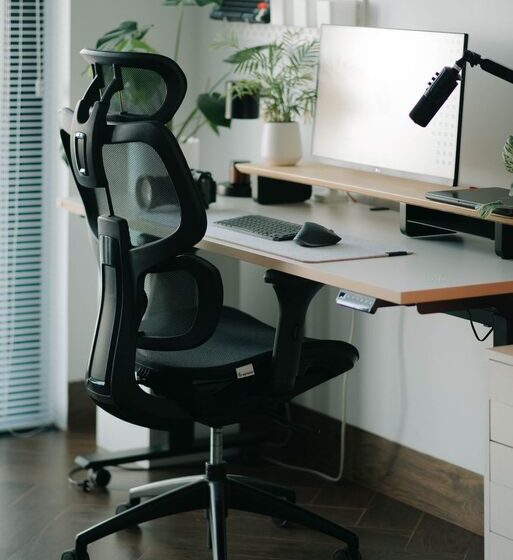

Creating an efficient and comfortable desk setup is essential whether you work from home, study, or spend long hours at a computer. A well-organized workspace not only improves focus but also reduces physical discomfort, helping you stay productive throughout the day. In this post, we’ll explore practical tips for setting up your desk to maximize both comfort and concentration.
Why Desk Setup Matters
When your desk is cluttered or poorly arranged, it can distract you and lead to physical strain. Proper desk setup promotes better posture, reduces fatigue, and creates an inviting environment that encourages productivity. By making thoughtful adjustments, you can enhance your work experience and protect your health.
Choosing the Right Desk and Chair
Desk Height and Size
Choose a desk that fits your space and provides enough surface area for your essentials—computer, notebook, and other tools. The ideal desk height allows your elbows to rest comfortably at a 90-degree angle when typing or writing.
Ergonomic Chair
Invest in a chair with adjustable height and good lumbar support. Your feet should rest flat on the floor or on a footrest, and your knees should be level with or slightly below your hips to maintain good posture.
Monitor Placement for Eye Comfort
Position your computer monitor directly in front of you, about an arm’s length away. The top of the screen should be at or just below eye level to reduce neck strain and prevent eye fatigue. If you use multiple monitors, align them side by side with minimal head turning.
Keyboard and Mouse Setup
Place your keyboard and mouse close enough to avoid overstretching your arms. Your wrists should be straight and supported, ideally with a wrist rest. Mechanical keyboards with tactile feedback can improve typing comfort for some users.
Lighting: Bright, But Not Glare
Good lighting helps reduce eye strain and keeps you alert. Natural light is best, so position your desk near a window if possible. Use adjustable desk lamps with warm, bright light for evenings or low-light conditions. Avoid direct glare on your screen by adjusting blinds or using anti-glare screen protectors.
Organize Your Desk to Reduce Clutter
Essential Tools Only
Keep only the items you use daily within reach. Store less frequently used supplies in drawers or shelves to free up space.
Cable Management
Use cable clips or sleeves to keep cords organized and prevent tangling. A tidy workspace helps you focus better and reduces stress.
Personal Touches
Add a small plant, photo, or motivational quote to make your workspace pleasant without overcrowding it.
Incorporate Movement and Breaks
Sitting for long periods can lead to discomfort and fatigue. Consider a sit-stand desk or take short breaks every hour to stretch and move around. Even simple actions like shoulder rolls or wrist stretches can help maintain comfort.
Additional Accessories for Comfort and Productivity
– Monitor Stand: Raises your screen to the correct eye level.
– Footrest: Supports your feet if your chair is too high.
– Desk Organizer: Keeps pens, notebooks, and other essentials neatly arranged.
– Noise-Canceling Headphones: Helps block distractions in noisy environments.
Conclusion
A thoughtful desk setup can greatly improve your workday by enhancing focus and reducing physical strain. By selecting ergonomic furniture, organizing your space, optimizing lighting, and incorporating movement, you create a comfortable environment that supports productivity. Take time to personalize your workspace and adjust it as needed to find what works best for you!